Relocation of job
Relocation of job
A relocation occurs when you move to another city or state for a job. People relocate for jobs every day for a variety of reasons. A relocation takes a lot of thought and planning. Fortunately, you can take certain steps to evaluate whether a job-related move is right for you. And, if it is, you can begin to plan for your next home.
A relocation occurs when you move to another city or state for a job. People relocate for jobs every day for a variety of reasons. A relocation takes a lot of thought and planning. Fortunately, you can take certain steps to evaluate whether a job-related move is right for you. And, if it is, you can begin to plan for your next home.

SALEsCARE
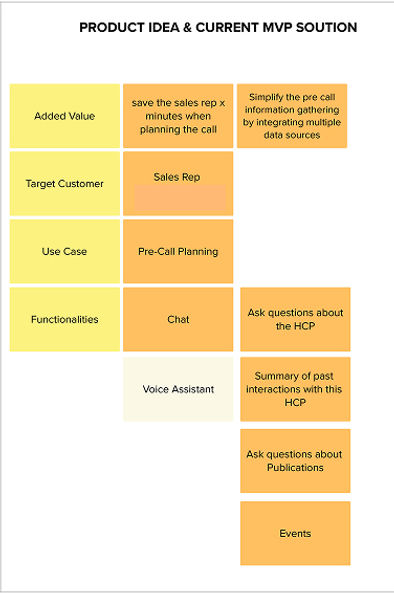
Intelligent Assistant for Pharma Sales Representatives
Designing an AI-assisted operating system for pharmaceutical sales representatives

OVERVIEW
SALEsCARE is an AI-powered assistant designed to reduce operational friction for pharmaceutical field sales representatives. The product helps reps prepare for doctor visits, answer in-the-moment medical queries, and complete follow-up actions—all within the constraints of short, interruption-prone field sessions.
As the lead Product Designer, I led the initiative from problem framing to system design, partnering with product, data science, engineering, and business stakeholders to translate fragmented workflows into a cohesive, trust-first AI experience.
The outcome was a measurable reduction in admin backlog, faster meeting preparedness, and higher tool adoption among reps.
MY ROLE
Lead Product Designer
(End-to-End Ownership)
Usability testing, User Research, Interactive Prototypes, System design, High-Fidelity Mockups
Platform:
Mobile + Web (responsive)
Timeline
July 2024-Jan 2025
This work demonstrates:
1. Context & Business Problem
2. Problem framing
3. Discovery & Research
6. Key Design Decisions & Rationale
7.Outcomes & Impact
9. Reflection (What I’d Do Next)
4. Design Principles
5. Experience Architecture
STORY
In the fast-paced world of healthcare sales, Rohini a seasoned sales representative, finds herself overwhelmed by an endless stream of doctor meetings, client queries, and administrative tasks. Despite his efforts, productivity seems to stagnate, and sales targets remain out of reach. One day, during a particularly hectic week, she misses an important follow-up call, and it costs her a big sale. .
Frustrated, Rohini realises that the root of the problem isn't his skills or knowledge—it's the lack of efficient support tools.
She recognises that sales reps like her need a way to streamline their work, automate routine tasks, and access critical information quickly. With the right support, she believes, sales reps could focus more on building relationships and closing deals, ultimately driving higher sales outcomes.

To tackle this challenge, we started the project from scratch, requiring extensive research. We needed to understand how other GenAI systems function, how conversational design works, and how to track user adoption throughout the process. By diving deep into these aspects, we aimed to create a solution that seamlessly integrates into a sales rep’s workflow, ensuring efficiency, adaptability, and real impact.
1. CONTEXT & BUSINESS PROBLEM
The Reality of Field Sales Work
Field sales representatives operate in high-pressure, time-constrained environments:
-
Back-to-back doctor meetings
-
Compliance-heavy documentation
-
Scattered systems (CRM, medical references, notes, emails)
-
Limited time on devices (often <5 minutes per interaction)
Despite multiple tools, reps were:
-
Underprepared for meetings
-
Overloaded with post-visit admin
-
Mentally juggling compliance rules
From a business perspective, this led to:
-
Low adoption of digital tools
-
Incomplete or delayed reporting
-
Missed opportunities for effective engagement
„My territory is large and the preparation of new assigned HCPs is time-consuming“


During a typical day, a sales rep faces inefficiencies which lead to longer working hours than required


… spends hours on the road driving to their customers

… spends additional time at home or at the parking lot summarizing the last meetings and preparing new visits

… Needs to use many different tools to perform their daily tasks
“Sometimes it‘s a challenge to find topics to talk about when you‘ve beeing seeing the doctor for years“
2. Problem Framing
How might we reduce cognitive and operational load for field reps—without increasing compliance risk—during short, fragmented moments of use?
3. Discovery & Research
Methods used
-
Contextual interviews with field reps
-
Shadowing ride-alongs (observational insights)
-
Stakeholder workshops with sales ops & compliance
-
Journey mapping of pre-visit → visit → post-visit
Requirement gathering
Insights from first Workshops


5
12
17 users
Target Customers
SalesRep/MSL
Insights from Users

Observational research
Using the observational research method, we captured farmer’s behavior in their natural environment. It helped us directly look at what farmers are actually doing, what kind of routines they could have with the application, and how the application can be used in different contexts of their lives.


This exercise helped us understand user's goals, motivations, and expectations, guiding us to address their frustrations.
Key Insights
1. Preparation Anxiety
Reps feared walking into meetings without:
-
Updated doctor context
-
Relevant product information
-
Recent interaction history
2.Micro-Moments, Not Sessions
Reps interacted with tools in:
-
Cars
-
Corridors
-
Waiting rooms
👉 Long workflows failed consistently
3. Trust > Intelligence
Reps did not want “smart” AI.
They wanted:
-
Verifiable answers
-
Source transparency
-
Predictable behavior
RESEARCHING BOTS AND CONVERSATIONAL UI
Majority of the research for this project was to learn about conversational UI, chatbots, and how the design process fits in the system.
Have people already developed any processes?
-
What are the user intents?
-
What are key chatbot Output?
-
What are the flows?
-
What are the User feedback on friction points?
-
How can we increase the engagement of the user?
-
How do you write dialog?
-
Chatbot platform requirements and platforms
-
A peek into voice assistants and chatbots
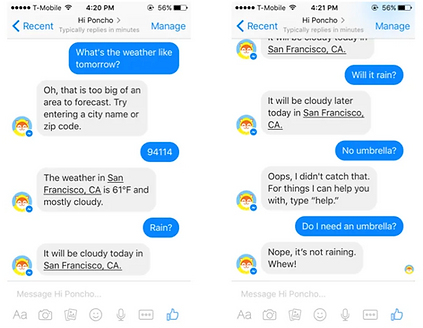
CHATBOT PLATFORM REQUIREMENTS
Prior to trying platforms, I developed the follow criterias to grade platforms:
-
Natural Language Processing (NLP): Ability to understand and process human language to enable meaningful conversations.
-
User Intent Recognition: Ability to identify the purpose behind user queries to provide relevant responses.
-
AI and Machine Learning: Adaptive learning from user interactions to improve responses over time.
-
Customizable Flows: Ability to design and modify conversation pathways based on user needs and preferences.
-
Integration Capabilities: Seamless integration with CRM, databases, APIs, and third-party tools for data access and sharing.
-
Multi-language Support: Ability to support multiple languages for global reach.
-
Security and Privacy: Compliance with data protection regulations (GDPR, HIPAA) and secure data handling.
-
Escalation to Human Agents: Option to hand over to a live agent when the bot cannot handle complex queries.


DEFINING THE EXPEREINCE
BOT PERSONAILITY
-
Tone: Friendly, professional, and context-aware (empathetic when needed, upbeat when appropriate).
-
Language: Clear, concise, and jargon-free. Conversational with polite humor.
-
Empathy: Acknowledge concerns, show patience, and offer reassurance in tough moments.
-
Proactive: Suggest helpful actions based on context without being pushy.
-
Adaptable: Tailor responses to the user’s tone, role, and familiarity.
-
Authentic: Be transparent about being a bot—e.g., “I’m here to help as your assistant.”
-
Error Handling: Apologize gracefully, guide toward solutions, and offer alternatives.
-
Brand-Aligned: Reflect brand values—empathetic in healthcare, engaging in tech.
-
Inclusive: Use culturally sensitive and inclusive language.
-
Consistent: Ensure a uniform voice for trust and reliability.


-
Context in which the bot operates: Sales representatives use the bot in various settings—at home, while parked in their cars, or even during commutes. The bot helps them prepare for upcoming doctor appointments, document notes after meetings, and organize those notes within the corresponding doctor’s profile.
Insights
Medical sales reps spend only 28% of their time selling, with the rest spent on admin tasks, research, and CRM updates. Personalized engagement and timely follow-ups improve doctor interactions and conversion rates. AI-driven tools help reps access medical data instantly, enhancing efficiency and compliance.
-
Instant Information Access: Sales reps need quick answers on product details, compliance, and customer history. A well-designed chatbot with natural language processing (NLP) reduces search friction and improves response time.
-
Seamless Workflow Integration – Context switching between CRMs, emails, and notes disrupts productivity. A chatbot that integrates smoothly with existing tools can automate admin tasks and suggest relevant next steps.
-
Adaptive Learning & Personalization – Sales reps have different expertise levels and selling styles. An AI-driven chatbot that learns from interactions and provides tailored suggestions enhances efficiency and confidence over time.

User Adoption
-
Onboarding
-
Customization
-
Key features
-
Self -serve features
-
In app flows to show new or used features
-
User feedback on friction points
-
A/b testing
-
Re-engage with inactive users
4. Design Principles
1.Assist, Don’t Replace Judgment
AI supports decisions; reps remain accountable.
2. Moment-Optimized UX
Every task should complete in <2 minutes.
3. Explainability Over Automation
AI responses must show why, not just what.
4. One Cognitive Goal per questions with feedback
Reduce mental switching costs.
These principles guided trade-offs throughout delivery
MAPPING THE CONVERSATION
Before adding the conversation to Motion.ai, I first wrote it in Google Docs to spell-check the dialogue and ensure I had a backup of my work.
FROM MARKET (STRUCTRURE HCPs)
New HCPs
Primary Goal:
-
Establish mutual trust and respect as a foundation for partnership
-
Adopt a CES mindset to position as a valuable partner.
CONVERSATION GUIDELINE FOR BOT
-
Here’s a concise set of conversation rules and guidelines for a bot:
-
Clarity: Use simple, jargon-free language. Avoid ambiguity.
-
Relevance: Respond to queries accurately and stay on topic.
-
Tone: Maintain a friendly, professional, and empathetic tone.
-
Conciseness: Keep responses brief but informative.
-
Adaptability: Adjust tone and detail based on user needs.
-
Consistency: Use uniform language and behavior across interactions.
-
Transparency: Acknowledge limitations and provide alternatives if unable to assist.
-
Proactivity: Anticipate needs and offer helpful suggestions when appropriate.
-
Privacy: Avoid requesting or storing sensitive information unnecessarily.
-
Feedback: Encourage user feedback to improve performance.
Key Information to Gather:
-
General Details: Location, specialty, and visit preferences (when and how).
-
Behavioural Style: Openness, patient-focus, or scientific-focused.
-
Professional Insights: Early adopter behavior, potential, and topics of mutual interest.
-
Treatment Preferences: Existing preferences and familiarity with our product.
-
Decision Triggers: Key criteria for prescribing.
-
Network Connections: Relationships with other HCPs and influence within the medical community (e.g., mentoring younger specialists, speaking at congresses).
-
Public Engagement: Congress participation and speaker reputation (e.g., check congress agendas).
-
Competitor Activity: Interactions with competitors (via discussions with HCPs or CES colleagues).
QUESTIONNAIRE SUMMARIZED FOR HCPs in CHATBOT


5. EXPERIENCE ARCHITECTURE
Instead of a generic chat interface, I designed three intent-driven entry points aligned to real workflows:
1. Prepare (Before the Visit)
-
Doctor profile snapshot
-
Past interactions
-
Suggested talking points (AI-assisted)
2. Ask (During the Visit)
-
On-demand medical & product queries
-
Source-linked responses (PubMed, internal docs)
-
Clear confidence indicators
3. Close the Loop (After the Visit)
-
Auto-drafted call notes
-
Follow-up reminders
-
Compliance-safe summaries
This reduced tool hopping and anchored AI to specific moments of need.
6. KEY DESIGN DECISIONS & RATIONALE
Decision 1: Task-First, Not Chat-First
Why: Open chat increased uncertainty and cognitive load.
What I did:
-
- Introduced structured prompts over blank chat
-
- Reduced decision fatigue
-
- Increased task completion rates
Decision 2: AI With Receipts
Why: Medical accuracy and compliance risk.
What I did:
- Designed response cards with:
-
Confidence levels
-
Source citations
-
“Verify” affordances
Decision 3: Progressive Disclosure
Why: Too much info overwhelmed reps
What I did:
-
High-level summary first
-
Drill-down only when needed
-
Maintained speed without sacrificing depth
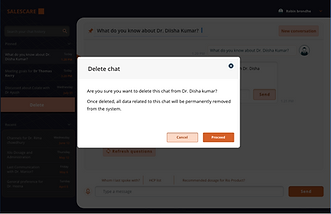
Conversation history
In a chatbot, conversation history helps maintain context, enabling personalized responses, continuity, and reducing repetitive inputs for a smoother user experience.
Key UX considerations include:
-
Persistence & Recall: Retaining relevant past interactions for a smoother experience.
-
Privacy & Compliance: Ensuring sensitive data is handled securely, especially in regulated industries like pharma.
-
User Control: Allowing reps to review, edit, or delete history when needed.


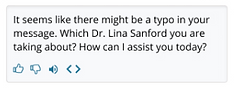
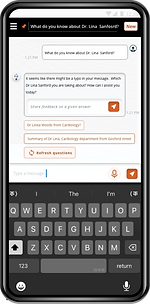
Recommendations
Recommendation questions in a chatbot should be context-aware, concise, and action-driven, guiding users toward relevant insights with minimal effort. They should adapt based on user input, offering personalized and intuitive responses while ensuring clarity and efficiency.

Feedback
- user feedback on friction points and what they plan to accomplish with your tool
Collecting customer feedback from users is the most accurate way your team can identify growth and adoption tactics for your product.
We can use digital adoption platforms, chatbots, or survey tools to consistently gather insight from users regarding their experience with your product and what we can do to improve it. With these tools, we can also target your feedback collection at points in the product journey where you’ve noticed lower levels of engagement.

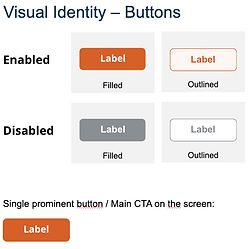
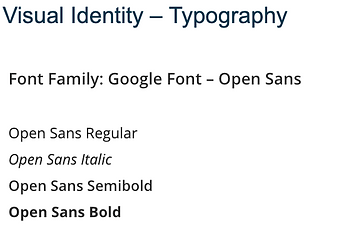
VISUAL GUIDELINE GLIMPSE
The visual design emphasizes clarity and accessibility, using earthy tones, icon-driven navigation, and high-contrast text for readability in outdoor conditions. Imagery focuses on real-life farming scenarios, reinforcing trust and relatability. The UI elements prioritize essential information, ensuring a seamless and efficient user experience tailored to the needs of Indian farmers
With an intuitive interface, we ensure ease of use for farmers, integrating regional languages and simple navigation.


PERSPECTIVE


WHERE DO WE STAND NOW? WHAT's THE NEXT STEP?

Usability Study
-
Give users what they are searching for
-
Upfront Data availability
Testing -Mandi feature
ITALY

Target Customer
Sales rep
11 Users
Participated in the test
Test Time
Self-determined use of the AI assistant for 1 week
Feedback
Online questionnaire & online meeting


Pains
-
Response Time: The responses were often slow.
-
Accuracy: Many of the answers provided were incorrect in several areas.
-
Value: I haven't found any significant value or useful information yet.
-
Prompt Dependency: The quality of results seemed to vary greatly depending on how the prompts were worded.
-
Relevance: There was a lack of information about relevant doctors.
-
Email & Newsletters: These seemed to be treated inconsistently.
-
Knowledge Gaps: The chatbot often lacked knowledge and offered irrelevant suggestions.
Gains
-
Effortless Management: Streamline tasks for easy handling.
-
Time Efficiency: Maximize time between client interactions.
-
Simplified Processes: Reduce complexity for smoother workflows.
-
Quick Access to Doctor Information: Easily retrieve relevant details about doctors.
-
Centralized Control: One contact point to manage everything efficiently.
Missing piece
-
Operating hours and consultation availability
-
Contact number
-
Past interactions or activities
-
Email contact

7.Outcomes & Impact
-
30–40% reduction in post-visit administrative backlog, as reps were able to complete call notes and follow-ups immediately after meetings rather than batching them later.
-
~2× faster meeting preparation, with reps accessing doctor context, past interactions, and relevant product information in under a minute.
-
20–25% increase in tool adoption compared to previous sales enablement solutions, driven by task-first workflows and reduced cognitive load.
-
Higher task completion rates during short sessions, with most core actions completed in under 2 minutes.
-
Improved trust in AI responses, reflected in increased usage of AI-assisted answers once source visibility and confidence cues were introduced.
-
Cleaner and more timely CRM data, improving downstream reporting and manager visibility.
Overall, the product shifted AI from an experimental feature to a daily-use, business-critical assistant, delivering measurable efficiency gains while maintaining compliance and user trust.

REFINEMENT
Future of SALESRep with BOT
8. Reflection
-
Introduce manager-level insights from aggregated rep data
-
Explore voice-first interactions for hands-free moments
-
Further personalize AI behavior based on rep seniority


Hi Bot, could you provide a summary of the HCP I’ll be visiting next
Certainly, here's a brief overview of Dr. Sayoine. She is...

Future bot with a holographic interface, blending cutting-edge technology with seamless user interaction
Hello Bot, please record the following details of my discussion with Dr. Bhowmik.